


Kali ini saya ingin memperkenalkan satu lagi versi Windows XP modified dari CatalogK. CatalogK adalah pendesain OS terkenal lainnya yaitu Windows XP Dark Edition v7, yang kali ini mereka merilis karya terbaru mereka yaitu, Windows XP SP3 DarkLite Edition Version 2011 pada 12/12/2010.
Tema pada OS ini masih sama, yaitu bernuansa Dark atau hitam. Dengan beberapa perubahan dan pengembangan, windows ini diyakini dapat menyamai kesuksesan versi-versi sebelumnya.
Berikut beberapa screenshot nya;


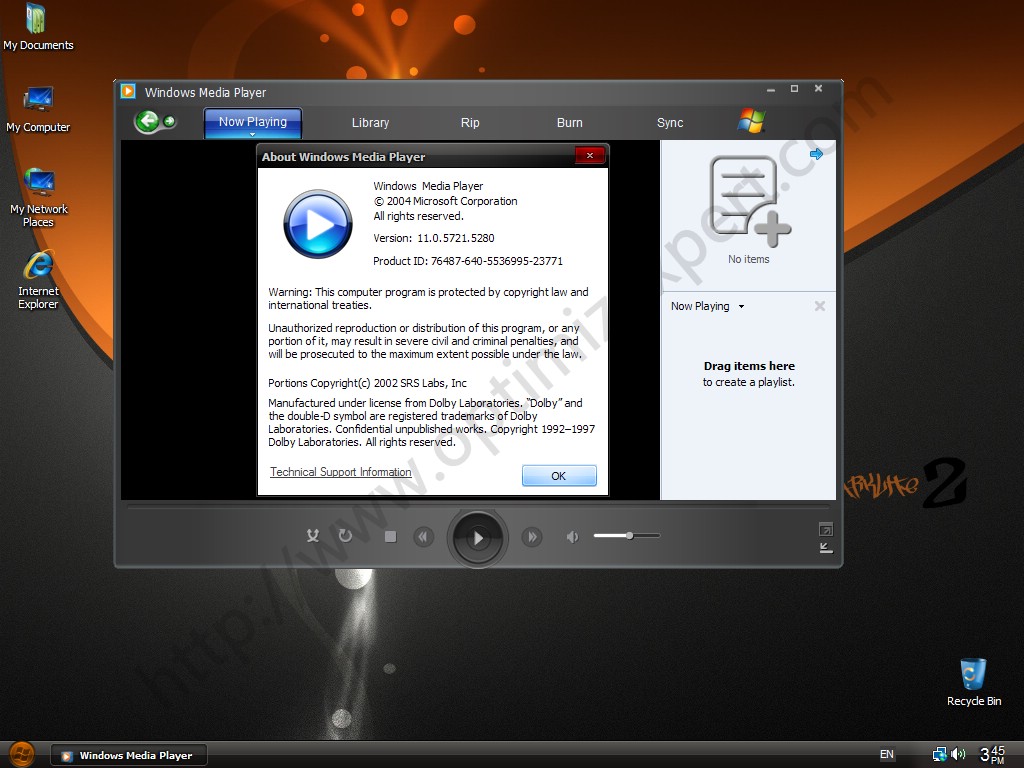


Ada beberapa update mulai dari software, hoftix, sampai sistem pada OS ini, diantara nya;
KB892130 - Windows Genuine Advantage Validation Tool ActiveX Control 1.9.42.0
KB898461 - Permanent copy of the Package Installer for Windows version 6.3.13.0
KB909520 - Software for Base Smart Card Cryptographic Service Provider
KB916157 - When you receive a Stop error message or a fatal system error message, a user-mode process dump file is not created in Windows XP
KB922120 - Network Map in Windows Vista does not display computers that are running Windows XP
KB931125 - Microsoft Root Certificates Update (October 2010)
KB932578 - Event ID 55 may be logged in the System log when creating many files on an NTFS partition
KB932716 - Image Mastering API v2.0 (IMAPIv2.0) package that is dated June 26, 2007 (cdrom.sys)
KB940648 - "You might not have permission to use this network resource" error when trying to open My Documents folder after resuming from hibernation
KB942213 - The MMC.exe program randomly becomes unresponsive when the user clicks OK or Cancel several times to close a Windows form
KB942288 - Windows Installer 4.5
KB943232 - An application that uses Sxs.dll crashes when running the application
KB944043 - Windows Server 2008 read-only domain controller compatibility pack
KB946648 - Security for Windows Messenger 4.7
KB947460 - ": is not accessible" error when trying to open a mapped DFS folder after coming out of standby
KB948046 - A Word document is not printed as expected after installing the Windows European Union Expansion Font pack
KB948101 - USB keyboard does not work after restarting a computer that has an NVIDIA 680i motherboard
KB948720 - Cannot install device drivers in a Windows Server 2008 cluster environment if the drivers contain LZ-compressed files
KB949127 - Cannot establish a wireless connection using EAP authentication if the Service Set Identifier (SSID) includes a comma
KB949764 - A USB device no longer works after resuming computer from hibernation (S4)
KB949900 - The RunOnce.exe process may stop responding during the driver installation process
KB950616 - An audio application that uses the Portcls.sys file may stop responding
KB950974 - Vulnerability in Event System could allow remote code execution
KB951126 - Multiprocessor computer stops responding on a black screen after resuming from hibernation
KB951163 - When trying to connect to the local computer using the MSTSC command, a black screen may appear for several minutes
KB951376 - Vulnerability in Bluetooth stack could allow remote code execution
KB951531 - The W32Time service does not synchronize the CMOS clock time to the Internet time after the W32Time service stops
KB951608 - Update for Credential Security Support Provider (CredSSP) in Windows XP Service Pack 3
KB951618 - A black screen occurs when upgrading the operating system on a computer that has Onekey Recovery 5.0 installed
KB951624 - A 30-second delay occurs during the initialization of some network-based applications
KB951709 - Event ID 26 when attaching two IDE ATA/ATAPI devices as master and subordinate IDE devices
KB951978 - Script output is not displayed as expected when running VBScript or JScript s--cripts
KB952004 - Des--cription of the security for MSDTC Transaction Facility (April 2009)
KB952011 - Image Mastering API v2.0 (IMAPIv2.0) package in Windows Feature Pack for Storage 1.0
KB952069 - Security for Windows Media Format Runtime and Media Foundation
KB952954 - Vulnerabilities in Microsoft Windows Image Color Management could allow remote code execution
KB953024 - Rich Text Format (.rtf) files may not print correctly when using an application that uses the RichEdit control
KB953028 - An application experiences an access violation and then crashes if the computer has more than four cores or more than four logical processors
KB953155 - Vulnerability in Windows Internet Printing service could allow remote code execution
KB953609 - "At least one of your changes was not applied successfully to the wireless configuration" error when adding a wireless network
KB953761 - Some DHCP Options are not recognized when the DHCP server offer includes option 43
KB954155 - Vulnerabilities in Windows Media Runtime Could Allow Remote Code Execution (Windows Media Audio Voice Decoder)
KB954193 - Jet 4.0 Database Engine cumulative hotfix package: July 2 ,2008
KB954232 - On-Screen Keyboard behavior does not mimic the physical keyboard behavior in certain scenarios
KB954708 - Update to add support for the serialization of complex Extensible Metadata Platform (XMP) data types in the Windows Imaging Component
KB954920 - Various error messages when an application requests a result set from new SQL Server 2008 collations
KB955069 - Security for XML Core Services 3.0
KB955109 - 0xC0000005 (Access Violation) error when running an application that uses the Application Desktop Toolbar (AppBar) component
KB955356 - When trying to start a computer that is connected to an IEEE1394 hard disk, it stops responding before the logon screen appears
KB955417 - Protected storage (PStore) uses a lower-quality cryptographic function when the system locale is set to French (France)
KB955567 - Data corruption may occur when trying to append data to a FILESTREAM varbinary (max) column in SQL Server 2008
KB955576 - TAPI-based applications stop responding, and you cannot disconnect telephone calls on a Windows XP-based telephony server
KB955704 - Support for the exFAT file system format
KB955759 - AppCompat for Indeo codec: December 08, 2009
KB955830 - When you connect to a Windows XP-based computer by using a remote desktop connection,the computer may be not able to automatically enter the Sleep mode again after you log off the computer
KB955843 - An ADO-based application may stop responding when it uses the adAsyncExecute option to open a Recordset object
KB955988 - The Win32_Environment WMI class doesn t return the value of the PATH environment variable if it contains more than 1,024 characters
KB956048 - An application that calls the Image Color Management (ICM) functions in the Icm32.dll module may crash
KB956072 - Terminal server does not allow RDP connections whose encryption level is set to Low
KB956391 - Cumulative security for ActiveX (October 2008)
KB956572 - Des--cription of the security for Windows Service Isolation (April 2009)
KB956625 - Computer becomes unstable or crashes after running Internet Explorer 7 for a long time
KB956802 - Vulnerabilities in GDI could allow remote code execution
KB956844 - Vulnerability in DHTML Editing Component ActiveX Control Could Allow Remote Code Execution
KB957931 - A Windows XP-based computer does not respond to 802.1X authentication requests for 20 minutes after a failed authentication
KB958149 - Performance decreases when streaming isochronous data on a computer that has a TI IEEE1394 host controller
KB958244 - System may stop responding when restarting a multicore computer
KB958347 - Device that is connected through a 1394 FireWire hub is still present in system after hot unplugging it
KB958644 - Vulnerability in Server service could allow remote code execution
KB958690 - Vulnerabilities in Windows Kernel Could Allow Remote Code Execution
KB958752 - Application compatibility issue with the version of AFD.sys that is released with MS08-037 and MS08-066 security s
KB958817 - Automatic Update window may stop responding when using a WSUS server to deploy s
KB958869 - Vulnerabilities in GDI+ Could Allow Remote Code Execution
KB959267 - After repeatedly docking and undocking a portable computer,unable to change state of attached network device
KB959334 - Text that has the font set to Arial Black and the font style set to bold may change so that the font style is set to italic opening the document
KB959426 - Blended threat vulnerability in SearchPath could allow elevation of privilege
KB959439 - After uploading encrypted files to a WebDAV share,the files remain encrypted
KB959465 - Write protection does not always work on SD memory cards
KB960071 - An access violation occurs when using an application that calls the SQLExecDirect function of the SQL Server ODBC driver to run a long query
KB960380 - A hyperlink control that is used to open a file or an e-mail message fails in an application that uses MSXML 6.0
KB960417 - When running an application that uses the SystemTimeToTzSpecificLocalTime function,performance is very poor
KB960680 - Update the Slovak koruna currency symbol (Sk) to the Euro (€) the Turkish currency symbol from Yeni T?rk Lirasi (YTL) to T?rk Lirasi (TL)
KB960714 - Security for Internet Explorer
KB960859 - Vulnerability in Telnet Could Allow Remote Code Execution
KB961118 - All PCL inbox printer drivers become unsigned after you install the Microsoft .NET Framework 3.5 SP1
KB961187 - If you reconnect a removable storage device to a computer running Windows XP,the OS cannot find the removable storage device
KB961451 - Receive an incorrect value when you query the last-ed identity value after you use a client-side cursor to data to a table that contains an identity column in an application that uses ActiveX Data Objects
KB961503 - You cannot input characters as expected by using a non-English Input Method Editor in Windows Live Messenger
KB961605 - Vulnerabilities in Pragmatic General Multicast (PGM) could allow denial of service
KB961742 - Update for Windows XP SP3 to enable RemoteApp?
KB967048 - Error message on a Windows XP-based computer that has a USB card reader: "Stop 0x000000D1"
KB967756 - Update for Windows Installer 4.5
KB968389 - Update to help strengthen authentication credentials in specific scenarios
KB968537 - Vulnerabilities in Windows Kernel Could Allow Elevation of Privilege
KB968585 - A handle leak occurs in the print spooler service after you resubmit a print job to a shared printer on which the "Keep printed documents" option is enabled
KB968730 - Windows XP clients cannot obtain certificates from a Windows Server 2008-based certification authority (CA) if the CA is configured to use SHA2 256 or higher encryption
KB969059 - Vulnerability in Indexing Service Could Allow Remote Code Execution
KB969084 - Remote Desktop Connection 7.0 client for Remote Desktop Services (RDS) for Windows XP SP3
KB969238 - A data transfer is corrupted when you transfer data from or to a USB device on a computer that is running Windows XP
KB969557 - When you use the Windows Key+L keyboard sequence to lock a Windows XP-based computer shortly after you log on to the system,the operating system may be automatically unlocked and the desktop can be accessed
KB970254 - The modem does not work and you cannot open the "Network Connections" window after you unplug and plug in the modem several times when a PPP connection is established in Windows XP
KB970430 - Update that implements Extended Protection for Authentication in the HTTP Protocol Stack (http.sys)
KB970483 - Vulnerabilities in Internet Information Services (IIS) could allow elevation of privilege
KB970553 - Error message when you query Win32_Product class after you install applications by using Microsoft Windows Installer (MSI) 4.5 with "Per-User" option in Windows XP: "0x80041001 - Generic failure"
KB971029 - Update to restrict AutoRun entries in the AutoPlay dialog to only CD and DVD drives
KB971165 - The CLIENTNAME environment variable returns the value "Console" instead of the actual client name when users first log on to a Windows XP SP3-based computer by using Remote Desktop Connection
KB971234 - The Defrag.exe tool crashes when you run the Dfrgntfs.exe tool to defragment a hard disk on a computer that is running Windows XP
KB971314 - All PCL inbox printer drivers become unsigned after you install the Microsoft .NET Framework 3.5 SP1 or the XPS Essentials Pack in Windows XP
KB971345 - The LimitProfileSize Group Policy setting does not take effect when the size of a user profile is larger than 4 GB on a Windows XP-based client computer
KB971513 - Update for the Windows Automation API
KB971657 - Vulnerability in Workstation Service Could Allow Elevation of Privilege
KB971961 - Security Update for Js--cript 5.7 for Windows XP
KB971737 - Update that implements Extended Protection for Authentication in Microsoft Windows HTTP Services (WinHTTP)
KB972270 - Vulnerability in the Embedded OpenType Font Engine could allow remote code execution
KB972422 - A Windows XP-based computer stops responding at the "Windows is loading your profile" screen when you connect to the computer by using an RDP connection
KB972435 - Slow performance when you try to open a redirected drive on a remote computer through a Terminal Services session
KB972878 - The "Guaranteed service type" Group Policy setting returns to the default value after you restart a client computer that is running Windows XP
KB973502 - Credential Roaming service for Windows XP
KB973507 - Security for the Active Template Library
KB973540 - Security for Windows Media Player 9
KB973624 - After you use a smart card to log on to a computer that is running Windows XP,Digest authentication fails
KB973685 - Update for Microsoft XML Core Services 4.0 Service Pack 3
KB973687 - When an application uses MSXML to process XHTML,redundant retrieval requests for well-known DTD files from the W3C Web server cause XHTML parsing to fail
KB973815 - Security for Microsoft MSWebDVD ActiveX Control
KB973869 - Security for Microsoft DHTML Editing Component ActiveX Control
KB973904 - Vulnerability in WordPad and Office Text Converters Could Allow Remote Code Execution
KB974112 - Vulnerability in Windows Media Player Could Allow Remote Code Execution
KB974266 - Group Policy Preferences Client-Side Extension Hotfix Rollup
KB974318 - Vulnerabilities in Internet Authentication Service Could Allow Remote Code Execution
KB974392 - Vulnerability in the Local Security Authority Subsystem service could allow denial of service
KB974571 - Vulnerabilities in Windows CryptoAPI Could Allow Spoofing
KB975025 - Security for Audio Compression Manager: October 13 ,2009
KB975467 - Vulnerability in Local Security Authority Subsystem Service Could Allow Denial of Service
KB975558 - Vulnerability in MPEG-4 Codec Could Allow Remote Code Execution
KB975560 - Vulnerability in Microsoft DirectShow Could Allow Remote Code Execution
KB975561 - Vulnerability in Windows Movie Maker Could Allow Remote Code Execution
KB975713 - Vulnerability in Windows Shell Handler could allow remote code execution
KB975791 - Update to Notepad.exe in Windows XP
KB976002 - Browser Choice is available in the European Economic Area
KB976323 - Vulnerabilities in Microsoft Exchange and Windows SMTP Service Could Allow Denial of Service
KB977816 - Vulnerability in Microsoft MPEG Layer-3 Codecs Could Allow Remote Code Execution
KB977914 - Vulnerability in Microsoft AVI filter Could Allow Remote Code Execution
KB978338 - Vulnerabilities in Windows ISATAP Component Could Allow Spoofing
KB978542 - Vulnerability in Outlook Express and Windows Mail Could Allow Remote Code Execution
KB978601 - Vulnerabilities in Windows Authenticode Verification that could allow remote code execution
KB978706 - Vulnerability in Microsoft Paint could allow remote code execution
KB978695 - Security Update for Windows Media Format Runtime 9 for Windows XP SP3
KB978835 - Service cannot access the ?? namespace in Windows XP
KB979099 - Rights Management Services Client with Service Pack 2 for Windows XP
KB979309 - Vulnerabilities in Windows Authenticode Verification that could allow remote code execution
KB979482 - Vulnerabilities in Media Decompression Could Allow Remote Code Execution
KB979687 - Vulnerability in COM Validation in Windows Shell and WordPad Could Allow Remote Code Execution
KB980195 - Cumulative Security Update of ActiveX Kill Bits
KB980436 - Vulnerabilities in SChannel Could Allow Remote Code Execution
KB981073 - FTP clients may not connect correctly to an FTP site that is hosted in IIS 5.0 or IIS 5.1
KB981322 - Vulnerability in Unicode Scripts Processor Could Allow Remote Code Execution
KB981349 - Vulnerability in VBScript 5.7 Could Allow Remote Code Execution
KB981793 - Cumulative time zone (May 2010) Daylight saving time (DST) 2010 hotfix
KB981852 - Vulnerabilities in Windows Kernel Could Allow Elevation of Privilege
KB981957 - Vulnerabilities in Windows Kernel-Mode Drivers Could Allow Elevation of Privilege
KB981997 - Vulnerability in Windows Movie Maker Could Allow Remote Code Execution
KB982132 - Vulnerability in the Embedded OpenType Font Engine Could Allow Remote Code Execution
KB982316 - Permissions Update for Windows XP Telephony
KB982551 - Vulnerability in Windows Client/Server Run-time Subsystem could allow elevation of privilege
KB982665 - Vulnerability in Cinepak Codec Could Allow Remote Code Execution
KB983234 - Update to Visual Basic Virtual Machine (MSVBVM60.DLL)
KB983246 - Update for Microsoft DAC
KB983458 - Vulnerabilities in SMB Client Could Allow Remote Code Execution
KB2079403 - Vulnerability in Microsoft XML Core Services Could Allow Remote Code Execution
KB2115168 - Vulnerability in Microsoft MPEG Layer-3 Codecs Could Allow Remote Code Execution
KB2121546 - Vulnerability in Windows Client/Server Runtime Subsystem Could Allow Elevation of Privilege
KB2124261 - Vulnerabilities in Microsoft Internet Information Services (IIS) ASP Could Allow Remote Code Execution
KB2141007 - Update to implement Extended Protection for Authentication for Outlook Express and Windows Mail
KB2158563 - Cumulative time zone (September 2010) Daylight saving time (DST) 2010 hotfix
KB2229593 - Vulnerability in Help and Support Center Could Allow Remote Code Execution
KB2259922 - Vulnerability in WordPad Text Converters Could Allow Remote Code Execution
KB2264107 - This helps protect against DLL preloading vulnerabilities in software applications on the Windows platform
KB2270406 - "0x000000D1" Stop error message when you try to refresh a webpage in Internet Explorer on a computer that is running Windows XP SP3
KB2279986 - Vulnerabilities in the OpenType Font (OTF) Format Driver Could Allow Elevation of Privilege
KB2282612 - Vulnerability in Microsoft DirectShow Could Allow Remote Code Execution
KB2286198 - Vulnerability in Windows Shell Could Allow Remote Code Execution
KB2290570 - Vulnerabilities in Microsoft Internet Information Services (IIS) Authentication Could Allow Remote Code Execution
KB2296011 - Vulnerability in Windows Common Control Library Could Allow Remote Code Execution
KB2345886 - Update that implements Extended Protection for Authentication in the Server service
KB2347290 - Vulnerability in Print Spooler Service Could Allow Remote Code Execution
KB2360937 - Vulnerability in Windows Local Procedure Call Could Cause Elevation of Privilege
KB2360131 - Cumulative Security Update for Internet Explorer 6 for Windows XP
KB2378111 - Vulnerability in Windows Media Player Could Allow Remote Code Execution
KB2387149 - Vulnerability in Microsoft Foundation Classes Could Allow Remote Code Execution
Other Updates
Adobe Flash Player 10.1.102.64 ActiveX Control
Code65536 FontReg 2.1.2
Microsoft European Union Expansion Font Update 1.2
Microsoft Qfecheck 6.2.29.0
Microsoft Windows Update Web Control 7.4.7600.229
Microsoft Update Catalog Web Control 7.4.7057.223
Microsoft Update Web Control 7.4.7600.226
MSXML 4.0 SP3 4.30.2107.0
Miscellaneous Tweaks
KB873374 - Microsoft GDI+ Detection Tool Registry Entry
KB890830 - Microsoft Malicious Software Removal Tool 3.13
KB905474 - Windows Genuine Advantage Notifications (Supressed MU Nag to Install)
===============================================================================
- Kels CPL Bonus Pack 11.6 By Kelsenellenelvian
- NR_CursorsAIO_Addon_1.3 By by MrNxDmX
- RedDX_0.0.1.1_32bit By Redxii
- RVMAddons_1.9.0 By RyanVM
- VistaDrive Addon For DarkLite2 By Catalogk
- WGA_Validation_AddOn_1.9.40.0-2 By Redxii
- IE8 Addon By YumeYao
- WMP11 Addon By YumeYao
- netfxAIO 2sp2 , 3sp2, 3.5sp1 By YumeYao
- RefreshClock Addon by ricktendo64 (Theme LClock Dark Contrast by ~zhuravlik26 Mod By Catalogk)
Jika anda tertarik ingin mencoba nya, silakan download via link ini ;
 |
| http://www.duckload.com/download/1718684/02.XP.SP3.DarkLite.Edition.2011.By.Doctor007.iso |


 Memfungsikan Firewall
  Menginstal ”required update” dari security updates microsoft yang direlease dengan kode update 823980
  Mengecek dan membuang nachi.
 Memfungsikan Firewall
  Menginstal ”required update” dari Microsoft Security Bulletin MS04 – 011
  Secara otomatis mengecek dan membuang sasser
 Menginstall dan memfungsikan Firewall
  Mengecek dan membuang mydoom
  Kita menyalin ataupun mendownload sebuah file yang terinfeksi virus ke dalam PC kita maupun melalui floppy disk yang sering dipinjam-pinjamkankan.
  Kita menerima email dari internet yang terdapat attachment didalamnya yang terinfeksi virus, karena dengan meningkatnya pemakai internet, maka trend penyebaran virus adalah melalui attachment email.
  Kita membuka file/aplikasi, file/aplikasi tersebut error, dimana selain error file/aplikasi tersebut tidak jalan dan tidak dapat dibuka.
  PC kita pada saat hendak dihidupkan dengan tiba-tiba men”shut down” dengan sendirinya
  Kita banyak mendapat file-file yang tidak kita kenal
  Jaringan LAN ataupun jaringan WAN di kantor kita tiba-tiba menjadi lambat sehingga memakan waktu yang cukup lama.
  Ada beberapa file di dalam PC kita yang hilang dan hard disk mendadak menjadi penuh serta performansinya menjadi lambat (memorinya)
  Menggunakan internet firewall
  Mengup-date PC secara reguler sangat penting. Menurut para periset dari PC Economics memperkirakan bahwa 30 persen dari usaha kecil sangat rentan terhadap bahaya virus dan itu dikarenakan mereka tidak mengupdate software antivirus mereka secara teratur atau mereka tidak menginstalasikannya secara benar.
  Selalu meng update software scanning anti virus dan selalu mendownload updatenya secara teratur. Saat ini sudah banyak PC yang dijual dipasaran sekaligus berikut software antivirus yang terinstal, namun kita juga dapat membeli software antivirus dan menginstalnya sendiri juga selalu meng update software antivirus tsb. Vendor software antivirus besar, seperti Mc Afee, Symantec, Network Associates, PC Associates, dan Kapersky Lab, menyediakan layanan update reguler (sebagai catatan PC Associates InoculateIT merupakan software antivirus yang gratis). Beberapa vendor juga menawarkan layanan update reguler melalui situs Web perusahaan mereka.
  Deteksi dan tentukan darimana asal dan lokasi virus tersebut. Misalnya disket, email dan sebagainya.
  Jika virus datang dari disket (external device), sebaiknya disket yang terinfeksi tidak lagi digunakan.
  Jika berasal dari email cobalah untuk membuat rule dengan memblok mail yang memiliki subject.
  Jika PC kita terhubung ke internet, baik melalui jaringan LAN maupun dengan akses dial up, sedapat mungkin putuskan hubungan tersebut. Hal ini perlu dilakukan agar virus tidak menginfeksi PC lain melalui jaringan.
  Identifikasi pesan error (kesalahan) yang timbul misalnya file corrupt atau terhapus. Hasil identifikasi ini bisa digunakan sebagai acuan jika kita akan mencari ke situs tertentu untuk mendapatkan antivirusnya.
  Scan dengan antivirus yang telah terpasang. Jika PC telah terinfeksi cobalah up date antivirus, jika virus teryata memblok akses untuk update, gunakanlah PC lain dan segera scan hardisk kita di PC tersebut.
  Langkah terakhir, jika tetap tidak bisa dibersihkan, usahakan selamatkan file yang belum terinfeksi dan segera format ulang


 Bhokalor
 My Picture
 My Code
 Contact
 Chat Room
 RSS Feeds
 Twitter
 Facebook